

Introduction
Connect a Potentiometer to a Bit Board and control a Piezo with code.
We'll explore how we can make sounds using a piezo speaker with a potentiometer.


Video Overview
Featured Document
-
-
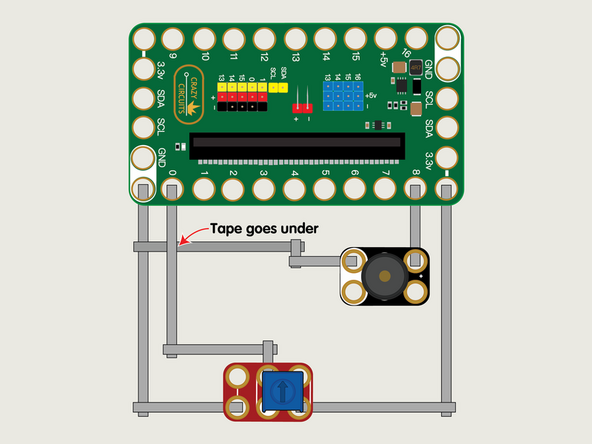
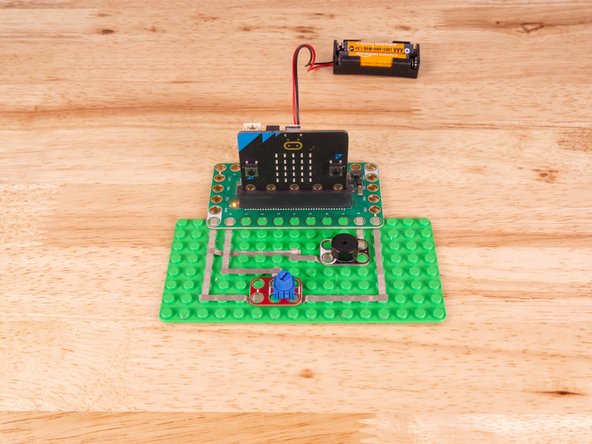
We'll use Maker Tape to connect the Potentiometer and the Piezo to the Bit Board on a LEGO baseplate.
-
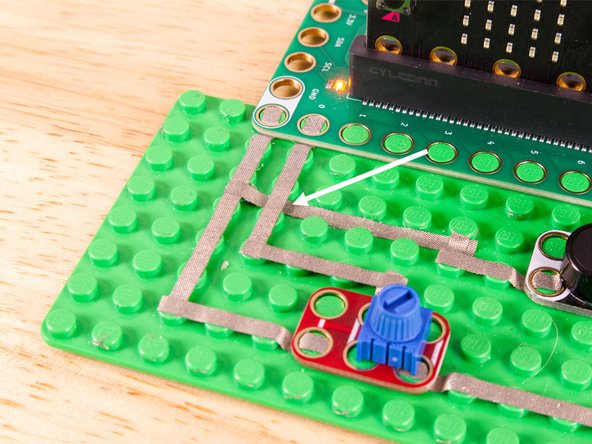
The Piezo will connect to Pin 8 and to Ground (GND) BUT! We're going to use the "gutter" between the LEGO baseplate studs so we can have two layers of tape that do not touch.
-
See the photos to show how this works. It's a technique we'll use for certain projects. It can also be used when you're tight on space for tape paths.
-
Once the Piezo is connected we'll need to connect the Potentiometer. One side goes to Ground (GND) and the other side to 3.3v
-
We will then connect the center of the Potentiometer to Pin 0. (Note that Pin 0 is an analog pin.)
-
You'll notice the Ground on the Bit Board (as well as the Potentiometer, Piezo, and other Crazy Circuits components we'll use) is color coded White.
-
The 3.3v hole on the Bit Board is labeled and is actually two holes right next to each other on the Bit Board. (There is a small line showing the connection between them.)
-
-
-
If you've never used a micro:bit before you'll want to check out this guide: Bit Board V2 Setup and Use
-
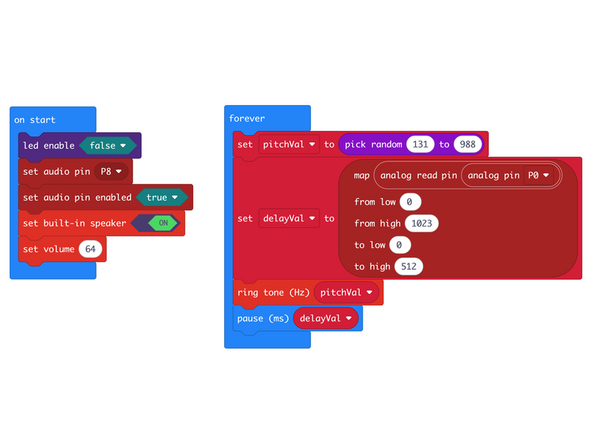
We're going to load the following code for our Potentiometer Piezo Delay program: https://makecode.microbit.org/_i8VA422r4...
-
The micro:bit (since the release of version V2) has included a built-in piezo speaker on the back. You can use the built-in Piezo on a V2 micro:bit or connect a Crazy Circuits Piezo with Maker Tape as we've shown in this guide.
-
We'll us the random function to choose a numerical value (between 131 and 988) and then play that tone and pause before choosing a new tone to play.
-
The Potentiometer will set a delay between 0 and 512 (about half a second) by mapping the input, which will be between 0 and 1024.
-
-
-
Once the code is loaded it should start running immediately.
-
You can power the micro:bit via the USB cable you used to load the code or you can use a battery pack plugged into the Bit Board.
-
The Piezo will create a different tone (randomly selected) and will change after a certain amount of time, as determined by the position of the Potentiometer.
-
-
-
Follow along with our recorded Live Stream!
-
You can watch the full video of us walking through this project, along with explaining and exploring the code: https://youtube.com/live/g6-AnKVkcFk
-
Attached Documents
