
Introduction
Connect a 270˚ Servo to a Bit Board and control it with code.
We'll explore how to control a servo motor.

Video Overview
Featured Document
-
-
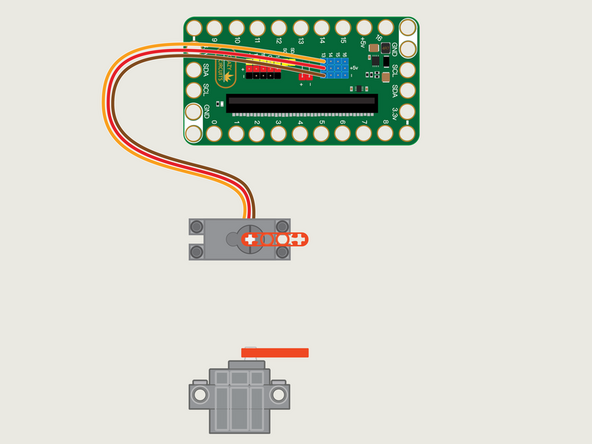
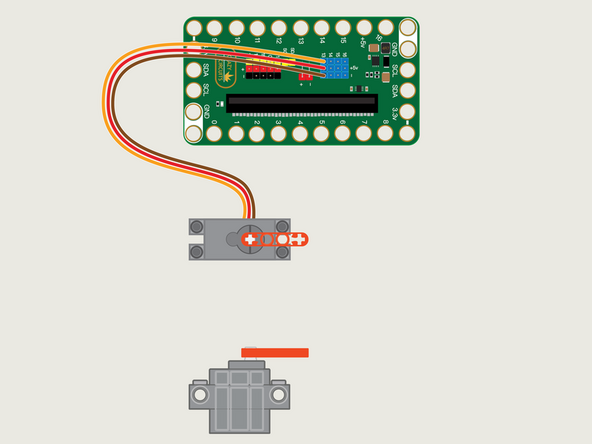
The 270 Degree Servo Motor has a 3-wire connector on the end that can plug directly into the pins on the back of the Bit Board.
-
Make sure the Orange Wire is closest to the number 13 for the Pin 13 column.
-
Then the Brown Wire should be closest to the micro:bit (in the - row) and the Red Wire will be in the middle (the +5v row).
-
-
-
If you've never used a micro:bit before you'll want to check out this guide: Bit Board V2 Setup and Use
-
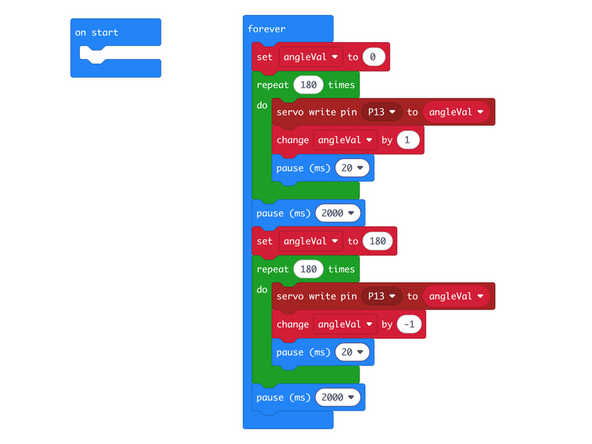
We're going to load the following code for our Servo Sweep Step program: https://makecode.microbit.org/_1TmAxb5sr...
-
This code is a little more complex, but allows us to slow down the sweep of the servo.
-
We'll start at the 0 position, then do a repeat loop 180 times, changing the angle by 1 degree, with a pause after each move.
-
Once done there will be a 2 second pause, then we'll then do the same thing, but in reverse, starting at 180 and going down to 0.
-
-
-
Once the code is loaded it should start running immediately.
-
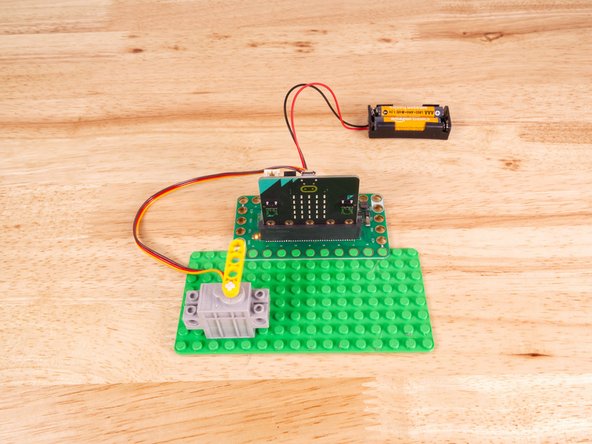
You can power the micro:bit via the USB cable you used to load the code, but now that we are using servos we recommend using a battery pack plugged into the Bit Board.
-
The Blue Pins on the Bit Board provide extra power (5 volts instead of 3 volts) by boosting the voltage coming from the battery pack. This helps improve servo performance, especially with multiple servos.
-
You can see the difference in power and speed by first running the code with just the USB cable powering the micro:bit and then plugging in the battery pack to the Bit Board.
-
Just like our last example the servo will "sweep" from one way to the other.
-
The difference this time is in how fast the servo moves...
-
Since we are moving the servo just one degree at a time, and pausing between each move, it's a much slower and smoother movement.
-
There may be times you want the servo to move more slowly or smoothly, and this is one method of achieving such movement.
-
-
-
Follow along with our recorded Live Stream!
-
You can watch the full video of us walking through this project, along with explaining and exploring the code: https://youtube.com/live/T8jrPuhOp_g
-

Attached Documents
