
Introduction
Connect a 270˚ Servo to a Bit Board and control it with a Pushbutton and code.
We'll explore using a momentary push button (and some code) to control the movement of a servo motor.


Video Overview
Featured Document
-
-
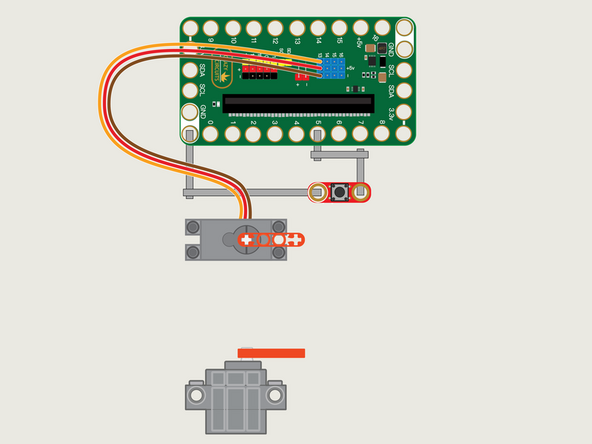
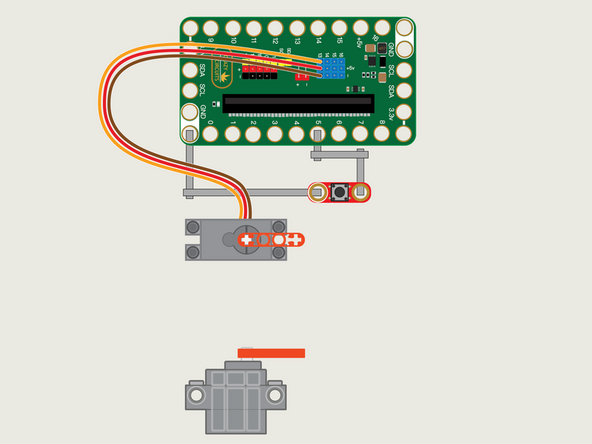
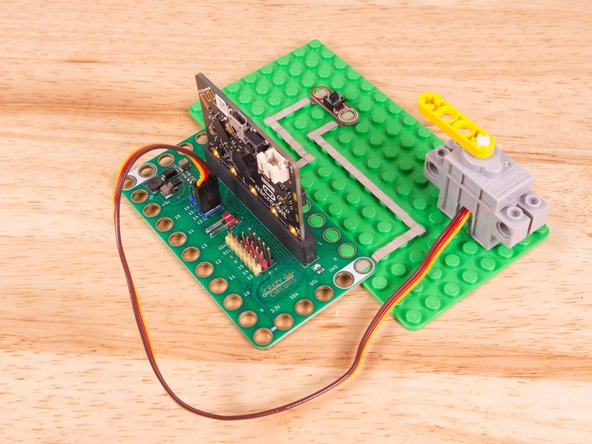
The 270 Degree Servo Motor has a 3-wire connector on the end that can plug directly into the pins on the back of the Bit Board.
-
Make sure the Orange Wire is closest to the number 13 for the Pin 13 column.
-
Then the Brown Wire should be closest to the micro:bit (in the - row) and the Red Wire will be in the middle (the +5v row).
-
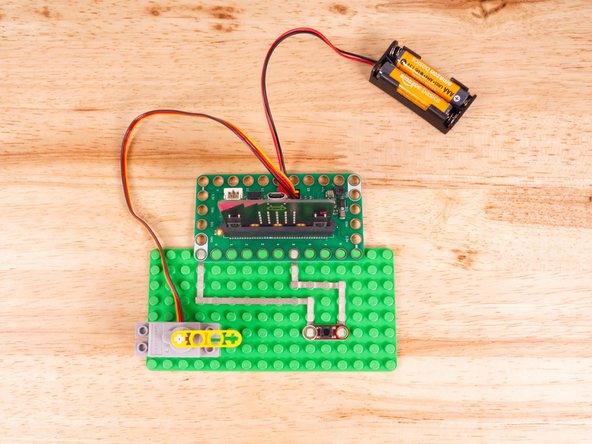
Connect the Button with Maker Tape, with one side to Pin 5 and the other to GND.
-
-
-
If you've never used a micro:bit before you'll want to check out this guide: Bit Board V2 Setup and Use
-
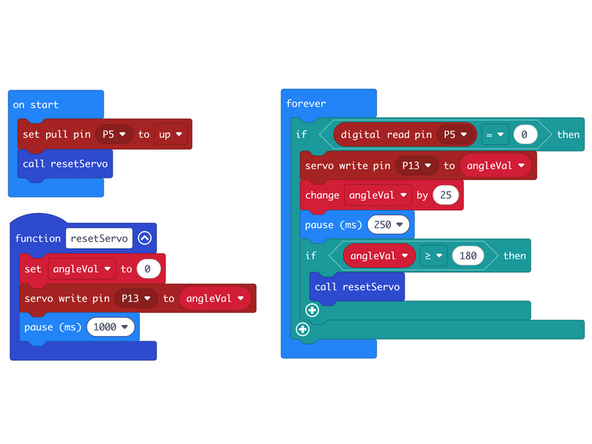
We're going to load the following code for our Servo Button Step program: https://makecode.microbit.org/_AMpWqJhg5...
-
In our start we'll set our pull pin and then call the resetServo function, which will set the angleVal to 0 and send the servo to that value.
-
We'll wait for the button to be pressed and then we'll move the servo, increase the angle by 25 degrees, and pause...
-
If the servo goes up to (or over) 180 degrees it will call the resetServo function again.
-
Functions that set things up can be useful for any code that needs a reset or starting point.
-
-
-
Once the code is loaded it should start running immediately, but the servo won't move until you press the button.
-
You can power the micro:bit via the USB cable you used to load the code, but now that we are using servos we recommend using a battery pack plugged into the Bit Board.
-
The Blue Pins on the Bit Board provide extra power (5 volts instead of 3 volts) by boosting the voltage coming from the battery pack. This helps improve servo performance, especially with multiple servos.
-
When the button is held down the servo will move anti-clockwise a small amount.
-
If you keep pressing the button (or just hold it down) the servo will go all the way to the end and then reset back to the start position.
-
This might be a good example for a game like Blackjack. You could generate random numbers for the servo move values and then see who can get closest to the end without going over and sending the servo back to the start.
-
-
-
Follow along with our recorded Live Stream!
-
You can watch the full video of us walking through this project, along with explaining and exploring the code: https://www.youtube.com/live/Og8T6cw5Ai0
-
Attached Documents
