
Introduction
Connect a 7 Segment Display and a Push Button to a Bit Board and control them with code.
We'll explore code to control a 7 Segment Digital Display that can show numbers up to 9999.


Video Overview
Featured Document
-
-
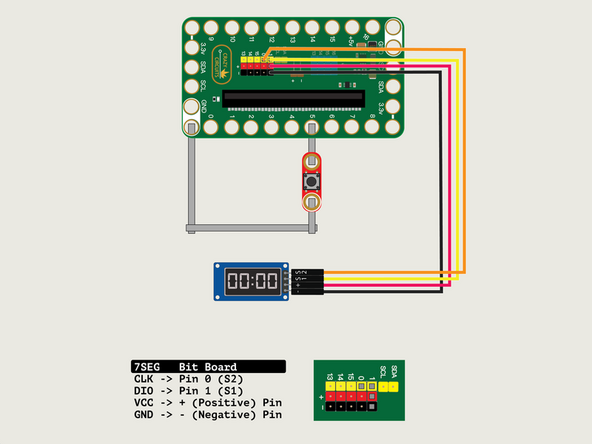
We'll connect the 7 Segment Display with a Crazy Circuits Ribbon Cable using all four wires.
-
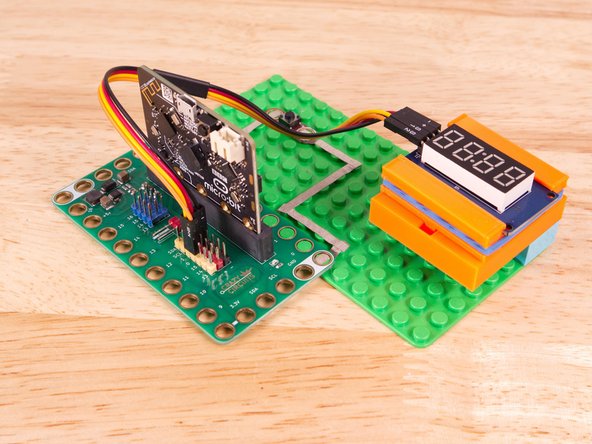
Start by plugging the connector with the three wires in it (Black, Red, Yellow) into the Pin 1 row of the Bit Board. (Make sure the Black wire is in - and the Yellow wire labeled S1 is closest to the number 1 on the Bit Board.) We can then plug the Orange wire labeled S2 into Pin 0 on the Bit Board.
-
Now we'll connect the other end of the Ribbon Cable to the 7 Segment Display. The pin labels are on the back of the 7 Segment Display PCB. From top to bottom it's CLK, DIO, VCC, GND.
-
CLK stands for Clock and DIO stands for Data Input/Output. VCC is the Positive (+) and GND is the Ground (-) or Negative.
-
S2 (Orange) goes to CLK, S1 (Yellow) goes to DIO, and then + (Positive) goes to VCC and - (Ground or Negative) goes to GND.
-
Make sure every wire is connected in the correct place, or our display will not work!
-
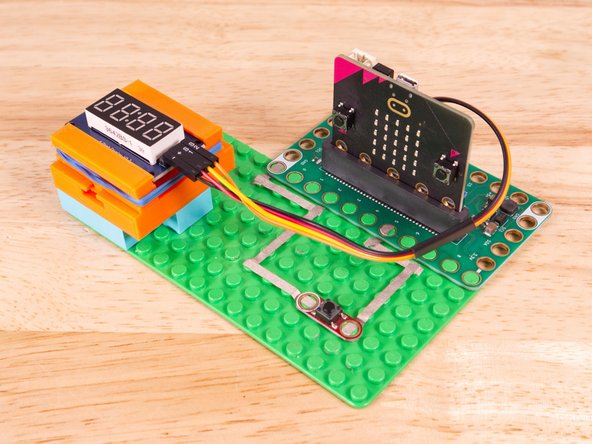
We'll use Maker Tape to connect the Button to the Bit Board on a LEGO baseplate. Connect the Button to Pin 5 and to Ground (GND).
-
-
-
We used a 3D printed holder we designed to hold the 7 Segment Display in place on the LEGO baseplate.
-
You can find the guide for the holder here: 7 Segment Display Holder
-
Alternately you can use some LEGO bricks and a rubber band or tape to hold the display in place.
-
-
-
If you've never used a micro:bit before you'll want to check out this guide: Bit Board V2 Setup and Use
-
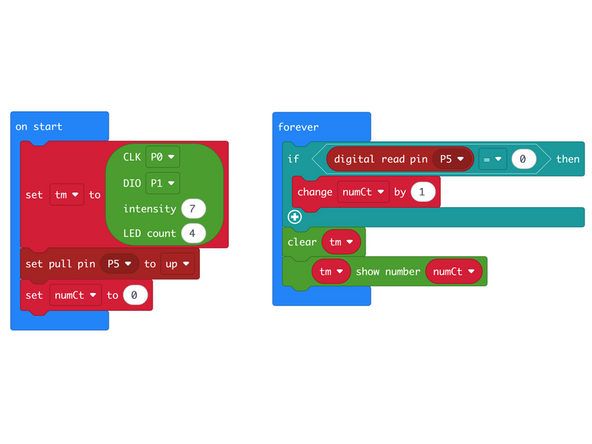
We're going to load the following code for our 7 Segment Count Fast program: https://makecode.microbit.org/_dE94Mh2Ya...
-
In the on start block we'll set up our display using the pins we've connected. CLK to Pin 0 and DIO to Pin 1.
-
In our forever loop we'll check for the button to be pressed (which will pull Pin 5 down to zero) and then we'll change the numCt by 1 so we can display our number.
-
Looking at this code it's easy to guess that the number shown on the display will go up by one when the button is pressed... but we'll see what happens in the next step!
-
-
-
Once the code is loaded it should start running immediately and the 7 Segment Display should show
0000. -
You can power the micro:bit via the USB cable you used to load the code or you can use a battery pack plugged into the Bit Board.
-
Press and release the button quickly... what happens? Did the number increase?
-
The number probably increased by more than one...
-
Since we told the code to increase the number when the button is held down (when Pin 5 is pulled down) it will do that, loop around again, very quickly, and increase it again, and again, until you release the button.
-
Because the code runs so fast, and the 7 Segment Display runs so fast, you may not be able to release the button fast enough to increase by just one. (But give it a try!)
-
-
-
Follow along with our recorded Live Stream!
-
You can watch the full video of us walking through this project, along with explaining and exploring the code: https://youtube.com/live/Hi5u_Rk5xBU
-

Attached Documents
