
Introduction
Connect two pushbuttons to a Bit Board and control an LED with code.
We'll explore how we can use two pushbuttons as inputs for the micro:bit


Video Overview
Featured Document
-
-
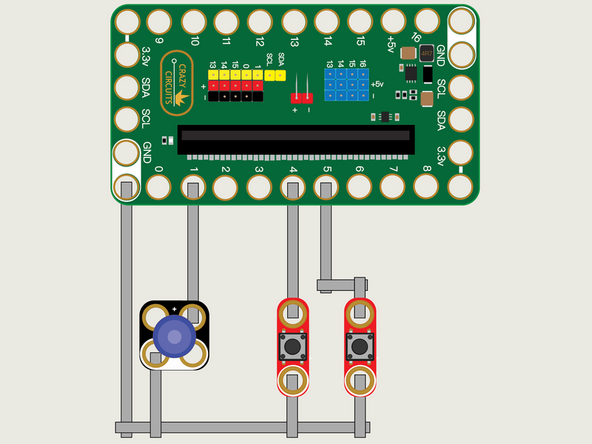
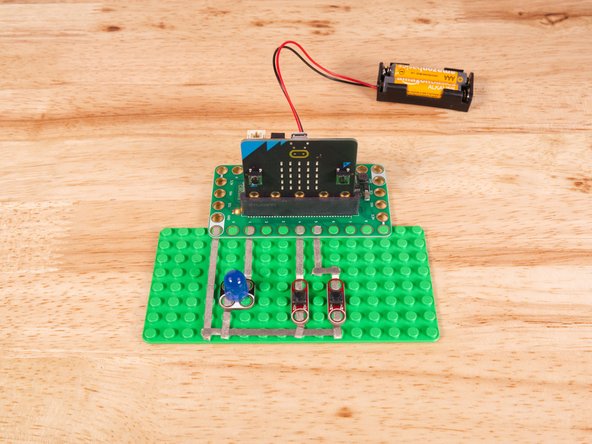
We'll use Maker Tape to connect the two Buttons and the LED to the Bit Board on a LEGO baseplate.
-
We'll connect our LED to Pin 1 and one of our Buttons to Pin 4 and the other to Pin 5.
-
And of course we'll connect the Ground (GND) sides of each component to Ground on the Bit Board.
-
You'll notice the Ground on the Bit Board (as well as the LED and other Crazy Circuits components we'll use) is color coded White.
-
While the LED has Polarity our Button does not. If you connect it the other way around it will still work fine. Not all components have Polarity.
-
-
-
If you've never used a micro:bit before you'll want to check out this guide: Bit Board V2 Setup and Use
-
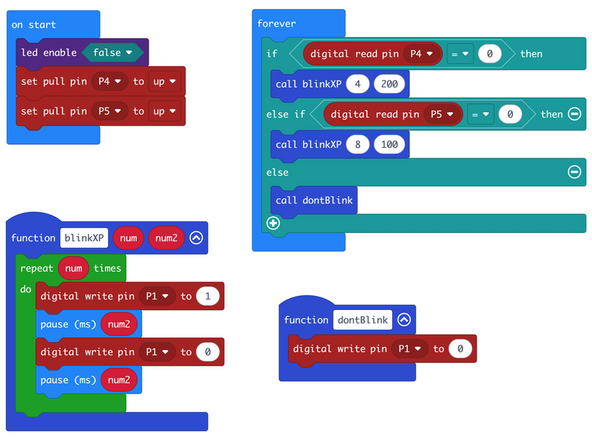
We're going to load the following code for our Two Buttons Functions Two Parameters program: https://makecode.microbit.org/_HiX4xiPCF...
-
This code will blink the LED 4 times if you press the left button and 8 times if you press the right button.
-
We now have just one function called blinkXP to handle the LED blinking. We call the function with two parameters. We have num to set how many times the LED will blink, and num2 to set the pause time between the LED turn on and off.
-
We could add more parameters if we wanted to, perhaps we want the two pause statements to use different values.
-
We still have our function named dontBlink that will be called when neither button is being pressed.
-
-
-
Once the code is loaded it should start running immediately.
-
You can power the micro:bit via the USB cable you used to load the code or you can use a battery pack plugged into the Bit Board.
-
The LED should turn on and blink either 4 times or 8 times depending on which button you press.
-
-
-
Follow along with our recorded Live Stream!
-
You can watch the full video of us walking through this project, along with explaining and exploring the code: https://www.youtube.com/live/_QU-qXrxYr4...
-
Attached Documents
