
Introduction
Use the micro:bit's built-in sound sensing capabilities to control a NeoPixel strip.
You can clap, yell, or play some sounds to activate your LED Strip.
You'll need a V2 or newer micro:bit as V1 does not have a built-in microphone.

Video Overview
Featured Document
-
-
The magical thing about these “Individually Addressable” LEDs is that you don’t have to connect each LED to an individual pin on your micro:bit, you just need one signal wire along with power (Positive and Negative) to light things up.
-
So let's get connected! If you turn the NeoPixel Strip over you'll see labels for the three pins. You should see IN, VCC, and GND.
-
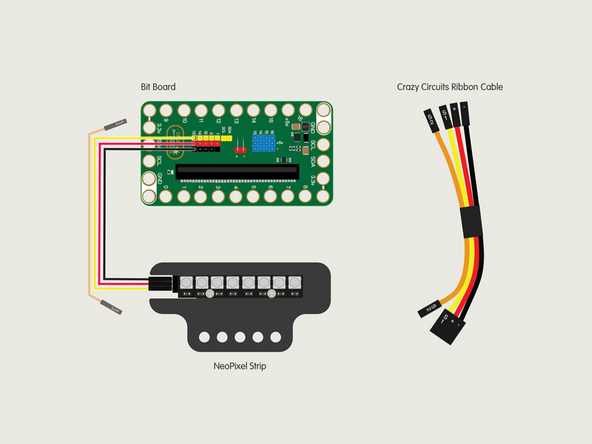
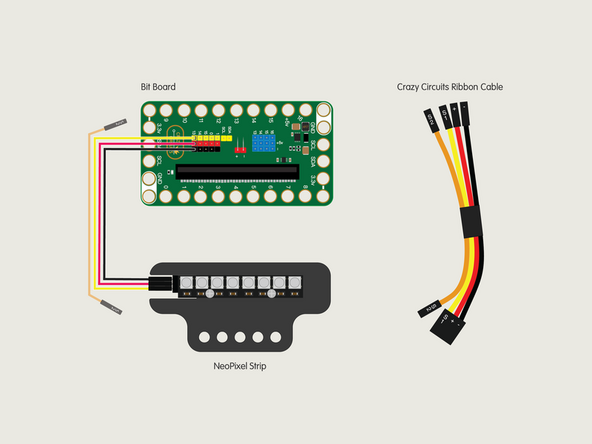
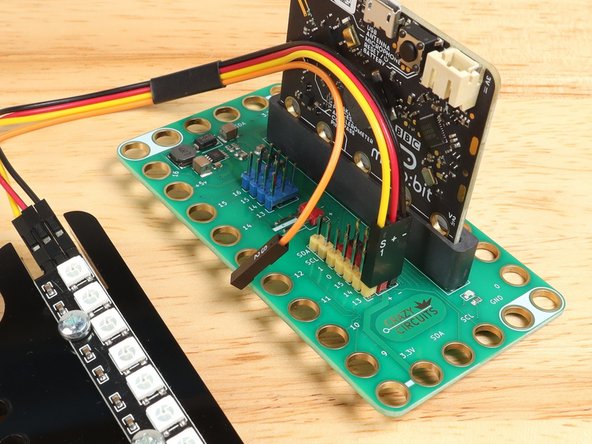
Use the Crazy Circuits Ribbon Cable to connect the NeoPixel Strip to the Bit Board.
-
The end with S1, +, and - can plug directly into the Pin 13 row (make sure S1 goes into 13) and the other end should plug into the NeoPixel Strip as shown.
-
We only need three wires for the NeoPixel Strip so you can leave S2 (the Orange wire) unconnected.
-
-
-
In the next step we're going to provide a link to the code for this project, but first let's look at the NeoPixel Extension for MakeCode.
-
The Extension has the basic blocks you'll need to set up the NeoPixel Addressable RGB LEDs and to control them with a micro:bit, and the Bit Board makes it very easy to connect things!
-
-
-
If you've never used a micro:bit before you'll want to check out this guide: Bit Board V2 Setup and Use
-
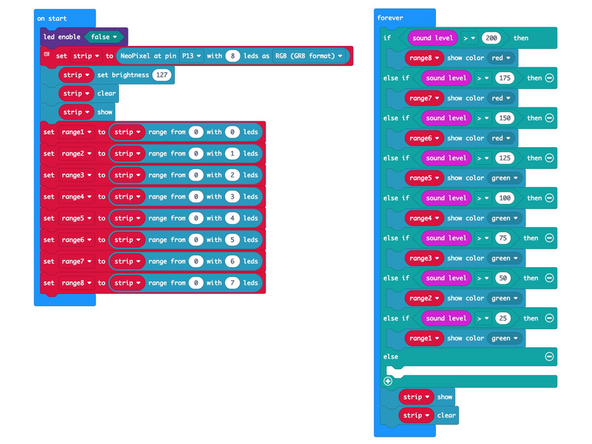
We're going to load the following code for our NexoPixel Sound Detecting program: https://makecode.microbit.org/_3wxATkDDo...
-
-
-
Leave the USB Cable plugged into the micro:bit and it should start to run the code as soon as it's loaded.
-
Depending on the noise level of the room you are in the NeoPixel Strip might light up a few LEDs.
-
If not, make some noise! Clap, yell, sing, scream! See what happens... How many LEDs can you light up?
-
Take a look at the code and see if it makes sense.
-
Feel free to play around with the code making changes to see how they affect the operation.
-
-
-
NeoPixels (or "Addressable RGB LEDs") are a fun way to practice your programming! We've got a few more examples to share.
-
-
-
-
-



Attached Documents
